Showing posts with label ICSP. Show all posts

Tuesday, January 21, 2014

A Stand-alone ICSP Interface/programming board for 8 and 28 pin AVR microcontrollers

Several weeks ago I got an "Ultimate 3" transmitter kit from Hans, G0UPL (See the web page http://hanssummers.com for more information) and built it with no problems. As is often the case with a project like this, an updated version of software was released that fixed some bugs and added new features (sometimes it works the other way-round!) and Hans posted the object code (.HEX) files so that others could update their software.

A couple of months ago I had also gotten a clone of the AVR ISP MkII with which AVR projects that include the ICSP (In Circuit Serial Programming) interface can be programmed, but the Ultimate 3 kit didn't have the ICSP pins of the processor broken out on the board so I had to build a stand-alone circuit with which I could program the chip after having been removed from its socket on the Ultimate 3 board.

Figure 1, below is the result.

Figure 1:
The ICSP Interface board 8 and 28 pin AVRs built onto a 1-3/4" x 1-1/2" (approx. 45 x 40mm) prototype board.
The 6 pin ICSP connector may be seen along the right side of the board.
(Yes, I know that the label says "8 & 20" pins - I changed it after taking the picture...)
(Click on the image for a slightly larger version)
The Atmel AVR chips are quite popular these days, being the basis of many of the Arduino boards and variants, but they are also popular for "ground up" projects - that is, a custom design needing a microcontroller - the Ultimate 3 being just one example.  To reprogram the U3's processor I would need a 28 pin socket, but since there was room on the board I decided to include an 8 pin for the ATtiny chips as well should I decide to build something around one of those in the future.

In looking on the GoogleWeb I saw a plethora of diagrams showing how these chips would be connected to either a 6 pin or 10 pin ICSP connector, so I built  the board above (sans oscillator at first - more on that in a moment) and tried to read the chip's signature....

It didn't work.

Oops - I'd forgotten a power supply, as the AVRISP MkII programmer didn't supply power to the chip being programmed.  No problem: I threw a 78L05 and a pair of 0.1uF capacitors on the board so that I could supply a stable, clean source of 5 volts externally.  Connecting the programmer again it now read 5.1 volts via the ICSP connector.  I again tried reading the chip's signature.

It still didn't work.

Trying the programmer on an Arduino board I verified that it actually worked - and then I remembered that there was a very good chance that these AVRs would need a clock source in order to function.  Rummaging around in my collection of resonators I found a 3-lead 4.0 MHz ceramic resonator with built-in capacitors and plopped it onto the board.

Success!

For some reason, I decided that that wasn't enough:  I thought "What if the fuses on the chip were configured to take an external clock source and the device was not configured to an external crystal?" - could an AVR be configured to be that way - even during programming?  Rather than research that point I decided to completely circumvent the issue and put a 4 MHz "can" oscillator on the board instead of the resonator and connect it to the clock/crystal input pin of the AVR designated as "XTAL1" on each of the two sockets.

At the moment I have only a few AVRs with which to test:  One of them was configured to use a 20 MHz crystal while the other was set up to accept an external oscillator for the clock.  When originally tested with the 4 MHz ceramic resonator, the one configured to use the crystal did work in this circuit but the other one did not.  Once I changed to a 4 MHz oscillator module they could both be read and written.
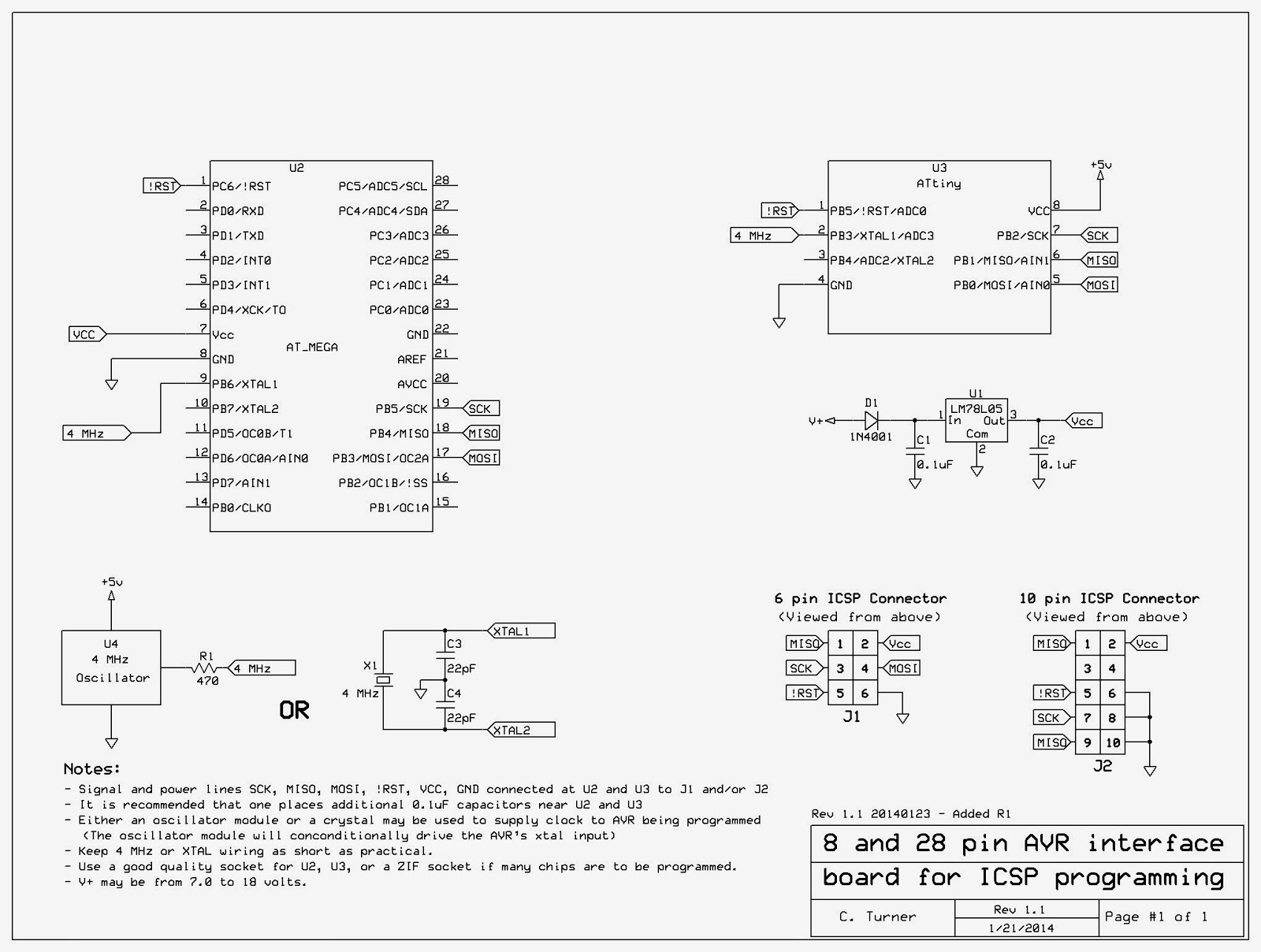
 
Figure 2: 
 Schematic diagram of the AVR ICSP interface board
(Click on the image for a larger version)


In Figure 2, above, you can see the final result and some notes.

I find it quite interesting that while I could find the ICSP connections for the AVR all over the InterWeb (or is it GoogleFace?) I could find not one of them (at least in the first half dozen pages of results...) that actually made mention of the need for a clock source or a self-contained power supply!  The assumption seemed to be that anyone, anywhere, would include the ICSP connections on their project board, already and never have a need to program a "free-standing" chip.

While my programmer has only the 6 pin ICSP connector I dug up the 10 pin connector pinout for the convenience of someone else who might have that.  I also included in the notes the option of using either a ceramic resonator/quartz crystal OR a 4 MHz "can" oscillator.

Later, I decided to add R1 on the oscillator module's output - just in case the fuses on the processor had been set to cause this pin be a logic output as might be the case if the AVR's internal oscillator is used - in which case, it probably wouldn't need any external crystal or oscillator at all.  The 470 ohm resistor allows the line to be driven easily, but limit the current to a very safe value were it set to a 0 or 1.

Note: 
The actual frequency of the crystal, oscillator or resonator is not important, but it must be within the ratings of the processor being programmed at the operating voltage provided by the programming circuit.  Also, the programming clock speed - selectable in the programming software - must be no faster than 1/4th of the oscillator/crystal/resonator frequency.
The default of 250 kHz is used in the version of Atmel Studio that I was running.  Anything in the 1 MHz to 8 MHz range for a crystal, resonator or oscillator module is likely to work equally well.  If the AVR is configured to use a very slow internal oscillator, the programming software would need to have its programming clock frequency changed accordingly.

While I used a 78L05 for the voltage supply to the chip being programmed, about anything that provides a stable and clean source of 3.3-5.5 volts would probably work (you'd have to verify the operating voltage range of the processor that you are programming) and this could even include the use of 3 AA or AAA cells in series to get 3-5 volts, the exact voltage depending on the condition of the battery.

If you do use a battery to provide power for the processor during programming make sure that there is at least one 0.1uF capacitor located near-ish U2 and/or U3.  If you use the crystal can oscillator with a battery you will need to add an on/off switch, but if you chose to use the crystal or ceramic resonator, instead, you could forgo the switch - provided that you never left a processor in either the U2 or U3 socket when done!

Comment:
A switch may be a good idea, anyway as it is recommended that one removes the power before plugging in or unplugging the processor from its socket - but I will admit that I frequently don't bother doing that and have never had a problem... yet...
There are AVRs out there than those with 8 and 28 pins - and maybe even some 8 or 28 pin devices with pin-outs that don't match Figure 2, but the 8 and 28 pin versions for which the sockets are wired are the two sizes for which I expect to have immediate need.

One thing that the AVR ISP and this board cannot deal with is if the AVR's LVP (Low Voltage Programming) has been disabled.  If you configure an AVR such that this feature is disabled it is possible that you will need to seek out a programmer with "High Voltage Programming" to reset the fuse and re-enable LVP. 

My prototype board is only 1-3/4"x1-1/2" (approx. 45x40mm) so there wasn't really enough room to put anything on it other than what I did - and I was barely able to cram the 4 MHz can oscillator on the board as it was!

[End]

This page stolen from ka7oei.blogspot.com

Tuesday, October 29, 2013

Fun with the Microchip PICKit 3 and the Sure Electronics DB-UD11111 ZIF adapter

For many years now I've been using my old, trusty Picstart Plus programmer for my PIC-based projects.  Having used PICs since about 1990 - and having a reasonable suite of development tools, including the CCS C Compiler.

Since (before?) the introduction of MPLAB-X a while ago, the Picstart Plus was not been actively supported - and it never did/will support some of the newer, fancier devices anyway, so I started to look around for a replacement.

I quickly came to the realization that the most reliable path to the newer chips was the PICKit 3, a USB-based device which is much more convenient - and faster - than the serial-based Picstart Plus, but I soon realized that in order to use it with a wide variety of devices I'd need to have some sort of external board with several different sockets on it:  Unlike the Picstart Plus - which would actually "rewire" itself to program about any PIC you threw at it, the PICkit 3 simply had several pins on it which connected to the user's board or to an external socket using the ICSP (In-Circuit Serial Programming) capabilities of modern PIC processors.

In looking around the web I spotted the Sure Electronics DB-UD11111 for just $9.95 - and it looked as though it would fit my needs:  It was fairly cheap and it looked as though it would be able to handle most of what I needed it to do having 40, 20 and 18 pin ZIF (Zero-Insertion-Force) sockets to accommodate the different PICs.  While it appears to have been originally designed for the PICkit 2, the same ICSP programming is used in the newer PICkit 3 so it would work equally well for both.  At $9.95, I knew that I would probably have trouble even buying three ZIF sockets for that price!

Comment:
It would appear that the Sure Electronics DB-UD11111 has vanished from the above web site (at least I couldn't find it there!)  It does seem to be available from other vendors on the web for a higher price than the original $9.95 and, at the time of this update (August 2015) it seems to be available on EvilBay, being sold by Sure Electronics in their very own store for around $15 - search for "DB-UD11111".
I'm sure that there are other ZIF socket arrangements that will permit the PicKit 3 to work with a wide variety of devices, but I am not familiar with them.

Several weeks after placing the order with Sure, both it and the PICkit 3 arrived from China and I sat down to study the board.

Unfortunately, the documentation supplied is very sparse to say the least as it is just a .PDF of the schematic diagram of the board!  In looking at the board - which seems to be fairly well built but a bit awkward to use (more about that shortly) - I could see that it was labeled for 18, 20 and 40 pin devices.


What about programming  8, 14 and 28 pin devices?

In seeing the 18, 20 and 40 pin sockets, I wondered about the other devices.

To answer this question looked at the data sheets for typical 8, 14 and 28 pin devices (e.g. PIC12F675/683, PIC16F688 and PIC18F2620, respectively) on the Microchip web site and compared them to the schematic of this ZIF board to satisfy a hunch - which I verified to be correct:  Microchip had thoughtfully placed the Vdd, Vss, Vpp, PGC and PGD pins - everything that you'd need to program modern PICs - in locations that physically translated to the the appropriate pins on different package sizes of these PICs.

In other words:
  • 18 pin PICs:  You program those in the 18 pin socket - that's obvious!
  • 28 pin PICs:  The programming pins on the 40 pin socket also align physically with those on the 28 pin PICs, so pin 1 of the 28 pin devices go in pin 1 of the 40 pin socket.
  • Figure 1: 
    The PICkit 3.  As you can see I
    added a label to remind me of the
    "power" configuration to make it
    work with devices plugged into
    the passive ZIF socket adapter.
  • 20, 8 and 14 pin PICs:  The connections on the 20 pin socket physically align with those required on both 8 and 14 pin PICs, so use that socket, aligning pin 1 of the 8 and 14 pin devices with the socket's pin 1.

Making it work:

After getting the PICkit 3 and firing up MPLAB, I initially had trouble getting it to see any PICs at all - that is, until I remembered that the PICkit 3 had the option of powering the PIC chip being programmed - or not. As it turned out, it defaults to "not" so I had to go into the "power" sub-menu and check the box that told the PICkit to power the target device.

After that, I could read and write to a PIC16F88.  "Great!", I thought,  so I tried a PIC12F683 - an 8 pin device.

No dice!

Hmmm...

Using an ohmmeter I verified that all of the pins went where the schematic said that they should go (they did) so why didn't the PICKit 3 "see" the 12F683?

On a hunch I put the voltmeter on the power supply pins of the PIC and saw about 4.75 volts - lower than the 5.00 volts that I'd selected in the "power" menu.  Setting it to 5.5 volts, I saw no change, so I dropped it to 4.5 volts and not only did the voltage on the PIC now read 4.55 volts (close enough!), but I could now read and write to the PIC12F683!

What's the deal, then?

As it turns out, the PICkit 3 gets its voltage for powering the PIC being programmed from the computer's USB port which, by definition, is somewhere around 5 volts - and in the case of this particular computer was right at 4.85 volts.  What this means is that the PICKit3 could never supply more than about 4.75 volts to the PIC as there is about 0.1 volts drop within its circuitry.
Figure 2:
The Sure DB-UD11111 socket adapter.
It's pretty well built, but the cover gets
in the way of the levers!  After
taking this picture I took the cover
off, saving it by sandwiching it
on the bottom cover to avoid
losing it somewhere.

What seemed to be happening was that at a voltage that was "too high" to be supplied by USB connection, the Vdd being supplied to the PIC could not be regulated by the PICkit 3 and was likely "dirty."

Setting it to a lower voltage safely below that which was provided on the USB port - say, 4.5 volts - "fixed" this problem.

Unfortunately, there doesn't appear to be a way in MPLAB to have it supply power to the target device by default so I have to remember to re-select these anytime I make a change to the configuration or start the program.  After a bit of fiddling I "discovered" that if you exit MPLAB (Version 8.9x) with the unit configured for 4.5 volts that it may remember that voltage setting next time it is powered up - but it still seems to require you to tick the box for the PICkit supplying power to the target device and verify that the programming voltage is still set to 4.5 volts.

In further testing with a few different PICs I found that I could read/write them at least as low as 3.5 volts, but I couldn't immediately find a specification as to the low end of Vdd range.  Since I was not using LVP (Low Voltage Programming) and the PICkit 3 was supplying the Vpp, this specification is likely somewhat relaxed for most devices.

One suggestion that has been made online is to connect the PICkit 3 to a powered USB hub that is supplied with 5.25 volts.  Interestingly, the voltage specification for USB 2.0 is 5.0 volts +/- 0.25 volts so their inclusion of 5.5 volts as a  valid programming voltage would never be satisfied by an in-spec USB connection!

A few more comments about the Sure DB-UD11111 socket adapter:

This socket adapter is built fairly well, but I removed the translucent top cover after taking the picture in Figure 2 as it also somewhat obscured the silkscreen notation on the board, including the indication of the location of pin 1 of the connecting cable. (it's the white wire on the right, if you are curious).

Another problem with this cover is that it gets in the way of the levers on the ZIF sockets:  You may need to use either your fingernails or a small tool to operate some of these levers unless you have fairly small fingers.

Was removing this cover much of a loss?  No, since I'll just make some labels, anyway to remind me where/how to orient 8, 14 and 28 pin devices.

On the bottom plastic cover on the board I attached some small, stick-on rubber feet to keep the unit from sliding around on the desk, as well.

Some final comments on the PICkit 3:

In the forums, blogs and comment boards, the PICkit 3 has been oft-maligned - and I can see why:  It is decidedly less user-friendly and idiot proof than the Picstart Plus in many ways as there are many things that can go wrong - particularly if you have integrated a PIC with ICSP in your project where there is more than jut the PIC being programmed to deal with.

To be sure, the "problem" with the Vdd supply being derived from the USB power source is a problem for those who use the PICkit 3 to supply power to the target device - and it would be really nice if there was the option in MPLAB to allow all of the power options to "stick":  A warning comes up anyway about powering 3.3 volt devices from 5 volts, so why not have that warning include any settings that you have overridden, too?

In my (thusfar) limited use, it is much faster than the Picstart Plus and it has been very reliable - once you know the tricks - with it being powered entirely by the USB interface, which is much more convenient than the Picstart with which required not only a USB-to-serial adapter to work with my laptop, but also a "wall wart" just to power the programmer.

Additional comment:

I occasionally have trouble programming PIC12F675's and PIC12F683's with the PICkit 3 because of this same problem.  In those cases, attaching a separate Vdd supply of 5 volts to the programming socket - to power the chip being programmed - always solves the problem.

I have no idea why it works most of the time and then fails at other times...

Why PICs?

These days, the PICs seem a bit passe to many as the Arduinos and their variants have caught the fancy of many experimenters.  True, there are many "shield" modules with lots of cool peripherals to be found and, perhaps most attractive of all, huge libraries of code available to get done what you might want to do.

While I have used the pre-built Atmel/Arduino devices peripherally (pun intended!) and they look cool, they have usually been a bit of an overkill - and certainly much more expensive (hardware-wise) than just a PIC and a few parts.  In most cases, when I have a project, it would take a bit of effort to shoehorn an already-made Arduino board into place to fit my needs than it would have been to simply design the device from the ground up to do just what I need:  After all, to get the processor, alone, working it may take as little as a capacitor, IC socket (in some cases, less than $2 in parts) and the processor itself to provide the basis of the hardware to which the rest of the project to which you'd need to connect any processor that you might use (PIC or not) to the rest of the project!

Since I have long had the development tools for the PIC (e.g. CCS C compiler, since the "Version 2" days) and was familiar with it, I already have a fairly large library of my own code from which to borrow - and occasionally, I may even "borrow" some ideas from other platforms as well!

In doing my PIC projects I have found the 8-pin devices to be the most all-around useful as it is often the case that just 6 I/O pins is enough to do what I need to do - anything from flashing some lights to controlling a fire siren to even doing some audio DSP/filtering - and I've probably dropped hundreds of these things into projects that I did on my own and for others.  Where 6 pins of I/O isn't enough, the 18 pin devices are about the right size for most other things - but I have used the 14, 28 and 40 pin devices where it made sense to do so!

Having said that, the Arduinos do look fun and one of these days I may just try one of the "canned" boards and then think how I might incorporate that into another project.  More likely, though, I'd probably just build something around the raw chip itself - just as I've been doing for years now with the PICs...


Update:
Since this was post was originally written I got another PicKit 3 and DB-UD11111 adapter - just so that I would have two:  One for the bench, and one for "on the go" when I needed to haul the programmer somewhere else, or for those times that I can't find the other one because there's too much junk on the workbench!

[End]

This page stolen from ka7oei.blogspot.com